Ask anyone who uses a mouse jiggler whether it's worth it and you'll get a shrug and a "yeah, probably." It runs in the background, it does its job, and you forget it's there. That's the point. But it also means you never see what it's actually doing for you.
So we built Insights: a running count of the time Virtual Mouse Jiggler has kept you active, on Mac, Windows and Chrome.
What Insights shows
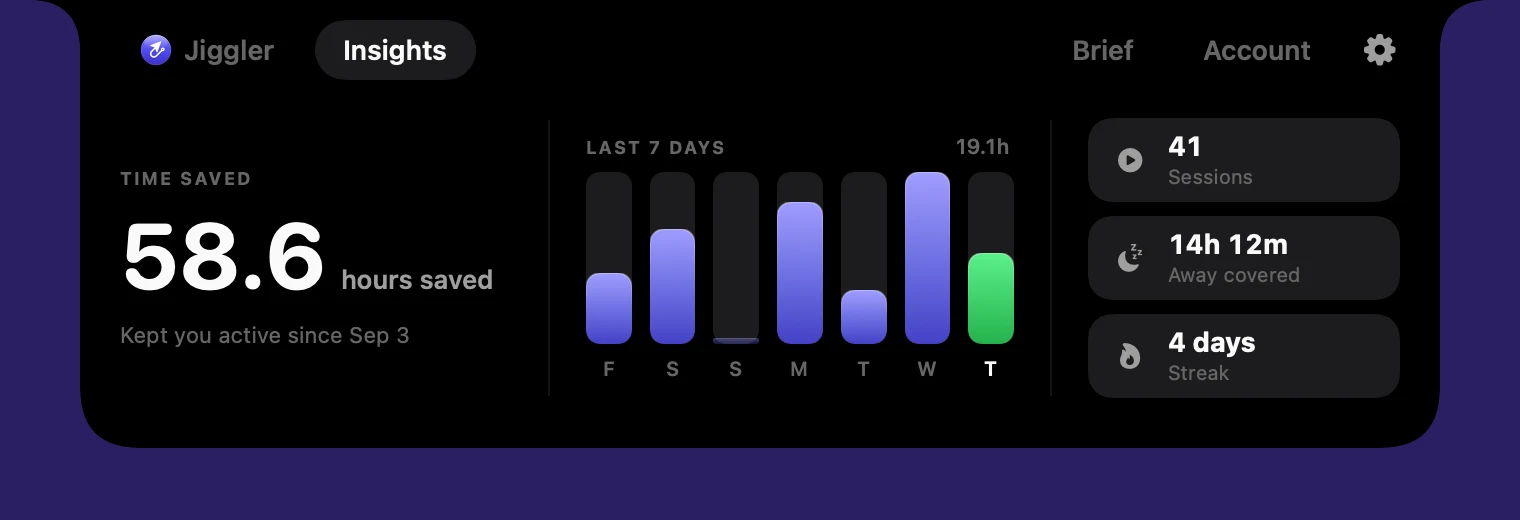
- Hours saved. Your total since you started, front and center.
- Last 7 days. A bar for each day, with today highlighted, so you can see your week at a glance.
- Away covered. The part of that time you were genuinely away from the keyboard: the coffee runs, the calls taken on your phone, the long render you walked away from.
- Sessions and streak. How many times you've run it and how many days in a row.
How the hours are counted
We wanted the numbers to be honest, not flattering. Insights only counts time when VMJ was actually running and keeping your computer awake. If your computer went to sleep or the app was closed, that gap isn't counted. "Away covered" is measured separately using your computer's own idle timer, and VMJ's cursor nudges don't count as you being present, so the figure reflects the time you were really away.
Everything is calculated on your device. It works offline, and nobody else can see it: not us, and not your employer.
So, how much does it save?
It depends on how you work, which is exactly why we show your own number instead of quoting an average. For someone who steps away a few times an hour, takes calls on their phone, or waits on long downloads and renders, it adds up quickly. Each of those moments is a few minutes where your status would have gone grey, your screen would have locked, or a download would have stalled.
A useful sanity check: compare your hours saved to what you pay. At $8.99 a month, if Insights shows even a couple of hours a month of real away time covered, it has paid for itself.
Where to find it
On Mac and Windows, open VMJ and click the Insights tab. In Chrome, it's the Insights card in the extension popup. Existing users already have it through automatic updates, and it's included in the free trial.