Keeping your status green solves half the problem of stepping away. The other half starts when you sit back down: a stack of unread badges across Slack, Mail, Calendar and Teams, and the nagging feeling that something important slid past while you were gone.
That's what the Away Brief is for. It's now built into Virtual Mouse Jiggler on Mac, Windows and Chrome.
How it works
While VMJ is keeping you active, it quietly notes the notifications that arrive. It doesn't interrupt you and it doesn't need any setup. When you come back to your computer, VMJ notices you've returned and opens the Brief tab with a short summary:
- How long you were away and how many notifications came in
- Each app on its own row, with a count and the newest message
- The most recent activity at the top, so the thing most likely to need you comes first
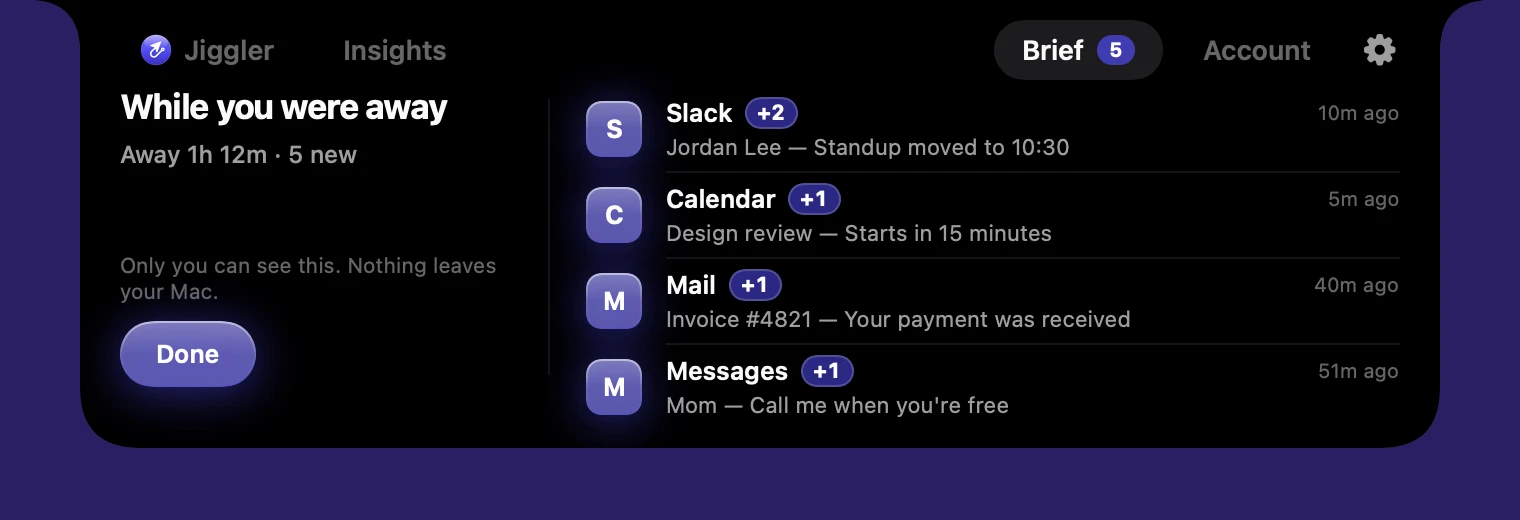
Read it, click Done, and you're caught up. No hunting through five apps to work out what changed.
Private by design
A summary of your notifications is personal, so the Away Brief never leaves your computer. It's stored locally, it isn't uploaded to our servers, and nobody else can see it. Only a small number of recent items are kept, and clearing the brief removes them.
On Mac and Windows you can switch it off anytime in Settings. In Chrome, the brief lives inside the extension popup and stays in your browser.
What it catches on each platform
Mac: the notification banners macOS shows while you're away. VMJ reads them with the Accessibility permission it already uses, so there's nothing new to approve. If Do Not Disturb or a Focus mode is hiding banners, those can't be caught.
Windows: the notifications Windows collects in its notification center, from Teams, Outlook, Slack and anything else that posts there.
Chrome: notifications from web apps open in your tabs, like Slack, Gmail or Teams on the web, plus new unread counts that show up in tab titles.
How to get it
If you already use VMJ, you don't need to do anything. The Mac and Windows apps update themselves automatically, and the Chrome extension updates through the Chrome Web Store. If you're new, the Away Brief is included in the free trial.